

How to Activate 5G on Android and iPhone (2026)
Learn where 5G is in Settings on Android and iPhone, whether you can convert a 4G phone to 5G, Ghana's 5G rollout timeline, and battery impact tips.

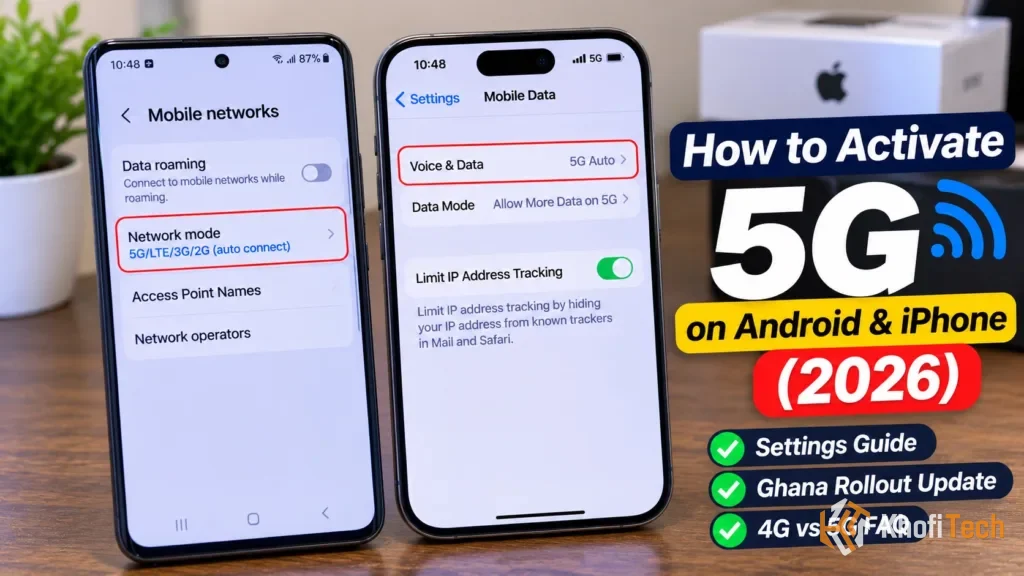
Whether you just upgraded your smartphone or want to make sure you are getting the fastest mobile data speeds available, knowing where 5G is in Settings—and separating real 5G hardware limits from internet myths—makes all the difference.
Below is a complete, step-by-step guide covering how to check if your phone supports 5G, how to enable it on Android and iPhone, the latest 2026 update on 5G availability in Ghana, and honest answers on battery drain and buying a 4G vs. 5G phone.
What Does 5G Mean & How to Know If Your Phone Supports It
5G stands for fifth-generation mobile network technology. Compared to 4G LTE, 5G delivers significantly higher download speeds, lower latency (less lag for gaming and video calls), and better network stability in crowded areas.
- On iPhone: Every model from the iPhone 12 series and newer (including iPhone 13, 14, 15, 16, and 17) has built-in 5G hardware. Older models like the iPhone 11 are 4G LTE only.
- On Android: Open Settings > Network & Internet (or Connections) > Mobile Network > Preferred Network Type / Network Mode. If 5G appears in the list, your phone supports 5G.
Where Is 5G in Settings? (Android & iPhone Steps)
Even on a 5G-capable phone, 5G is sometimes disabled by default to conserve power. Follow the menu path for your device:
| Phone / Platform | Settings Menu Path | Recommended Option |
|---|---|---|
| Samsung Galaxy | Settings > Connections > Mobile Networks | 5G/LTE/3G/2G (Auto connect) |
| Google Pixel / Stock Android | Settings > Network & Internet > SIMs > Preferred Network | 5G (Recommended) |
| Xiaomi / Redmi / Tecno / Infinix | Settings > SIM Cards & Mobile Networks > SIM | Prefer 5G / 5G/4G Auto |
| iPhone (iOS) | Settings > Mobile Data > Mobile Data Options | Voice & Data > 5G Auto |
Pro Tip for Dual-SIM Phones: 5G only runs on the SIM slot assigned to Mobile Data. Make sure your primary data SIM is selected in SIM Management before changing the network mode.
Can You Convert a 4G Phone to 5G or Use a 5G SIM?
- Can I Convert My 4G Phone to 5G? No. Ignore YouTube videos or Play Store apps claiming a secret dialer code (like
*#*#4636#*#*) turns a 4G phone into 5G. 5G requires a physical 5G modem chip and antennas inside the phone—software cannot add hardware you do not have. - How to Upgrade 4G Data to 5G: If you already own a 5G phone and live in a 5G coverage zone, you usually do not need a special “5G bundle.” Your existing mobile data plan uses 5G automatically once 5G is enabled in Settings and supported by your carrier.
- What Happens If I Put a 5G SIM Card in a 4G Phone? It works normally for calls, texts, and data, but your connection stays capped at 4G LTE speeds.
Is 5G Available in Ghana? (Latest 2026 Rollout Status)
If you live in Ghana and notice your 5G phone still shows 4G or LTE at the top of the screen, your phone is not broken—commercial consumer 5G signals have not yet gone live nationwide.
In late November 2026, Communications Minister Samuel Nartey George briefed Parliament that the government completed a revised 5G spectrum allocation across the 700 MHz, 2.3 GHz, and 3 GHz bands to open up operator participation. According to the ministry’s timeline, President John Dramani Mahama is expected to announce the official launch before the end of 2026, with everyday mobile subscribers beginning to see live 5G signals in early 2027.
Battery Drain, Pros & Cons, and Buying 4G vs. 5G in 2026
- Does 5G Drain the Battery Faster? Yes—especially in areas with patchy 5G coverage where your phone constantly scans for towers, or when Low Power Mode / Battery Saver is turned off and 5G On is forced. Selecting 5G Auto lets your phone drop back to 4G when idle, preserving battery life.
- Disadvantages of a 5G Phone: Slightly higher battery draw in weak-signal zones, faster data consumption when streaming high-bitrate video, and slightly higher upfront device prices on entry-level models.
- Should You Buy a 4G or 5G Phone in 2026? If you plan to keep your phone for 2 to 4 years, buy a 5G phone—modern 5G chipsets also come with faster processors, better cameras, and longer software support, and you will be ready the moment 5G expands in your area. Only buy a 4G phone if you are on a strict budget and upgrade frequently.
Frequently Asked Questions
Quick answers to common questions
On Android, go to Settings → Mobile Networks → Network Mode and select 5G Auto. On iPhone 12 or newer, go to Settings → Mobile Data → Voice & Data and select 5G Auto or 5G On.
No. 5G requires a physical 5G modem and antennas. Software, apps, and USSD codes cannot add this hardware.
According to the supplied article, nationwide consumer rollout is expected in early 2027 following revised spectrum allocation.
The SIM works normally, but your phone will connect at 4G LTE speeds because its modem does not support 5G.
Yes, particularly in areas with weak 5G coverage. Using 5G Auto helps reduce battery consumption by switching to 4G when appropriate.
Ask Khofi Tech
Related stories
TraffiTech-GH Guide: Portal, Speed Limits & Fines (2026)
Learn how TraffiTech-GH works in Ghana: official website and portal access, urban and highway speed limits, fine payment, and key rules.
How to Schedule Messages on WhatsApp (iPhone and Android 2026)
WhatsApp now supports native scheduled messages on iPhone and Android. Learn how to press and hold Send to schedule texts, photos, and videos—plus fixes if Send Later isn't showing yet.
How to Enable Developer Mode on iPhone
Learn how to turn on Developer Mode on iPhone in iOS 26, iOS 18, and earlier—plus how to fix Developer Mode not showing using Mac, Windows, or without Xcode.
Thread (0)