

What to Check Before Buying a Used iPhone (2026 Checklist)
Learn what to check before buying a used iPhone. From iCloud lock and battery health to genuine parts and IMEI verification, avoid getting scammed in 2026.

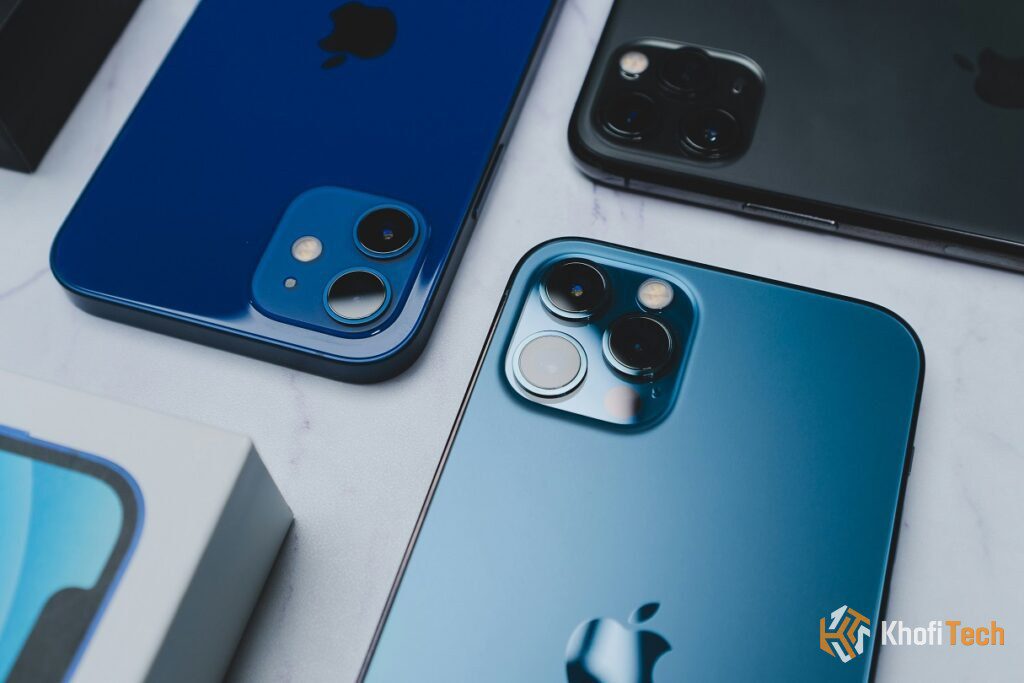
Knowing what to check before buying a used iPhone is the difference between landing a premium flagship bargain and paying for an iCloud-locked brick. While picking up a pre-owned iPhone 12, 13 Pro Max, or newer model saves significant money, the second-hand market is filled with hidden traps like bypassed Apple Accounts, degraded batteries, and cheap aftermarket screens.
Before you hand over your cash or approve a Mobile Money transfer, run through this step-by-step inspection guide to verify that the device is 100% genuine, fully unlocked, and worth your money.
The Used iPhone Inspection Checklist
| Check Item | What to Look For | Pass Condition | Verdict |
|---|---|---|---|
| iCloud Activation Lock | Settings > [Apple Account] & Factory Reset | Reaches “Hello” screen without password prompt | Mandatory |
| Carrier Lock (SIM) | Settings > General > About > Carrier Lock | Shows “No SIM restrictions” | Mandatory |
| Parts & Service History | Settings > General > About | No warning, or labeled “Genuine Apple Part” | Critical |
| Battery Health | Settings > Battery > Battery Health & Charging | Maximum Capacity >= 82% (No “Service” warning) | Negotiable |
| True Tone & Touch | Control Center brightness long-press & icon drag | True Tone toggle present; smooth touch tracking | Critical |
| Face ID / Biometrics | Settings > Face ID & Passcode | Enrolls face smoothly without “Issue Detected” alert | Mandatory |
| LCI Liquid Indicator | Inside SIM tray slot using a flashlight | Shows White or Silver (Red = Water Damaged) | Mandatory |
1. The Dealbreaker: Check iCloud Activation Lock
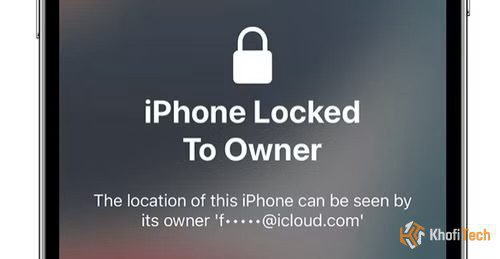
The single most critical check when buying a pre-owned Apple device is ensuring it is not locked to someone else. If Activation Lock is active, you will never be able to link your own Apple Account or update the phone.
- 1. Perform a Full Reset on the Spot: Never take the seller’s word for it. Have the seller go to Settings > General > Transfer or Reset iPhone > Erase All Content and Settings.
- 2. Watch the Re-activation: If prompted, the seller must input their Apple Account password to remove the lock.
- 3. The Pass Test: The phone will reboot to the multi-language “Hello” screen. Set it up with your own Wi-Fi or mobile hotspot until you land on the Home Screen. If it shows “iPhone Locked to Owner,” walk away immediately.
2. How to Check If an iPhone Is Original in Settings
Apple builds hardware verification directly into iOS. You do not need third-party tools to identify the device’s origin and whether it contains swapped parts:
Step A: Read the First Letter of the Model Number
Go to Settings > General > About and inspect the Model Number:
M (e.g., MLVE3LL/A): Brand-new device sold originally at retail.
F: Refurbished officially by Apple or an authorized carrier partner.
N: Replacement unit issued directly by an Apple Store for warranty claims.
P: Personalized device with custom engraving on the back.
Step B: Inspect Parts and Service History
Starting in iOS 15.2, any replaced part triggers a “Parts and Service History” banner directly below the serial number:
Genuine Apple Part: The component was replaced through an Apple Authorized Service Provider using authentic calibration software.
Unknown Part: The part was installed by a third-party repair shop using cheap aftermarket copies, or pulled from another salvaged device without cryptographic re-pairing. Avoid phones displaying “Unknown Part” on the display or camera.
3. Verify Carrier Lock & Clean IMEI Status
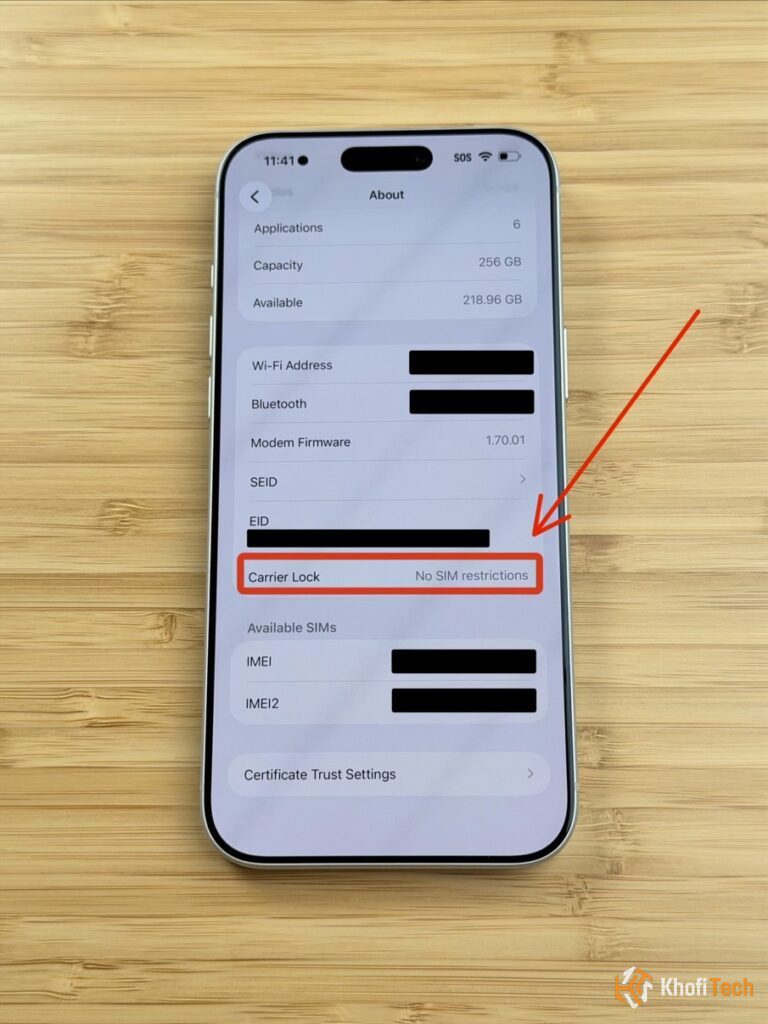
An iPhone can look pristine physically but be blocked from connecting to mobile networks.
Check Carrier Status
Go to Settings > General > About > Carrier Lock:
Pass: It must explicitly state “No SIM restrictions”.
Fail: If it lists a specific network (e.g., AT&T, Verizon, T-Mobile), you cannot use local SIM cards from MTN, Telecel, or other local telecom providers without an unofficial hardware bypass or expensive remote unlock.
Dial the IMEI Code
Open the Phone keypad and dial *#06#. Compare the pop-up IMEI against the number listed in Settings > General > About, and check the tiny engraving on the physical SIM tray. All numbers must match.
Paste the IMEI into free tools like IMEI.info or Swappa IMEI Check to verify it is not flagged as stolen, lost, or financed with unpaid balances.
Speed & Battery Diagnostic: If your current phone crawls or drains within hours, see our step-by-step guides on Why Is My Phone Running So Slow and Why Is My Phone Battery Draining So Fast before paying for a replacement.
4. Hardware Inspection: Display, True Tone & Face ID
- True Tone Test: Swipe down Control Center, long-press the Brightness slider, and confirm the True Tone icon is present. If missing, the screen is an uncalibrated third-party replacement.
- Digitizer Drag Test: Tap and hold any app icon until it jiggles. Drag it slowly across every corner of the screen. If the icon drops out of your finger’s hold, that part of the touch layer is broken.
- Face ID Setup: Open Settings > Face ID & Passcode and enroll your face. If it displays “Face ID Is Not Available”, the TrueDepth sensor was damaged by water or dropped.
- Liquid Contact Indicator (LCI): Pop open the SIM tray. Look inside with a flashlight. If you see a bright red dot, the device suffered water intrusion. A healthy device shows white or silver.
5. Battery Health & Replacement Thresholds
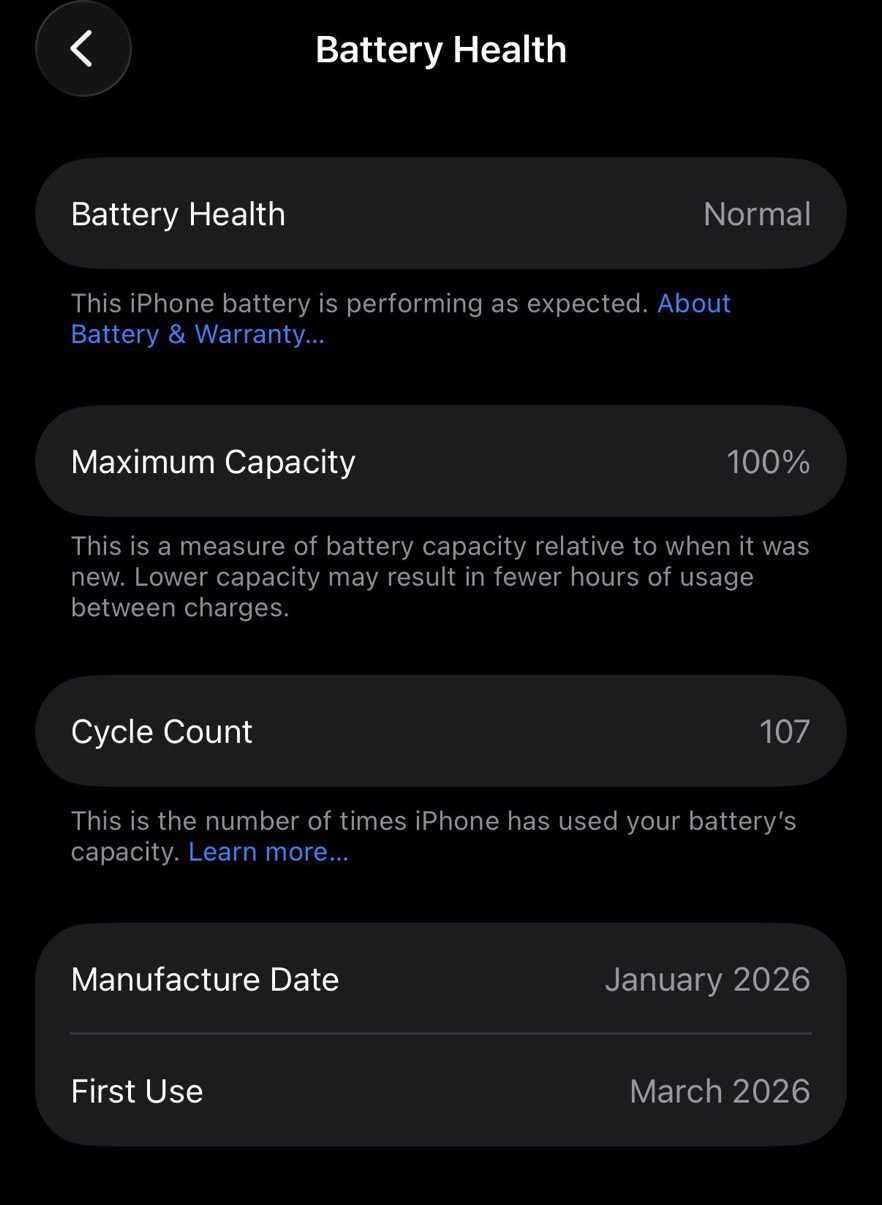
Go to Settings > Battery > Battery Health & Charging and check the Maximum Capacity:
85% – 100%: Healthy original battery. Expect reliable day-long performance.
80% – 84%: Moderate degradation. Still acceptable, but use this to negotiate a discount off the asking price.
Below 80% or “Service” Notice: The battery is chemically degraded. The phone will throttle CPU clock speeds under load to prevent shutdowns. Budget for an authentic battery replacement immediately.
6. What About Second-Hand iPhone Checking Apps?
If you prefer an automated diagnostic report, connect the device to a computer running 3uTools (Windows) or install Phone Doctor Plus directly from the App Store.
These diagnostic suites test all hardware features in 3 minutes—including speaker earpieces, internal gyroscopes, proximity sensors, charging port pin health, and camera stabilization modules.
Camera Hardware Check: Want to know how older models like the iPhone 12 Pro Max or 13 Pro Max hold up against modern competitors? Read our tested guide on Which Smartphone Has the Best Camera in 2026 to evaluate low-light sensors, optical zoom, and 4K video recording.
Frequently Asked Questions
Quick answers to common questions
Check the model number in Settings > General > About (starting with M or F), verify that True Tone works, ensure Face ID registers smoothly, and confirm there are no "Unknown Part" alerts under Parts & Service History. Finally, dial *#06# and enter the IMEI into Apple's official Check Coverage database to confirm original registration.
On an iPhone 13 Pro Max, pay special attention to:
1. ProMotion Display: Confirm smooth 120Hz scrolling without stutter or green tinting.
2. Camera Sensors: Switch between 0.5x, 1x, and 3x zoom to ensure the mechanical periscope stabilization does not vibrate or rattle.
3. Battery Capacity: The 13 Pro Max has a large 4352 mAh cell; ensure battery health is above 82% to maintain its signature 2-day battery life.
Always arrange the meetup in a safe, public location with active Wi-Fi. Never buy a phone that is already sitting on the Home Screen without performing a full reset in front of the seller. If the seller refuses to wipe the device or make a test call with your own SIM, decline the purchase immediately.
A "pre-owned" iPhone is simply a used phone sold in its current condition with no modifications or cosmetic repair. A "refurbished" phone has been formally tested, cleaned, and often repaired with replacement parts (such as a fresh battery or display housing) by a retailer or manufacturer before resale.


Thread (0)