

Best AI Tools for TikTok Creators in 2026 (Free & Paid)
Discover the best free and affordable AI tools for TikTok creators in 2026—from CapCut and ElevenLabs to Claude and OpusClip—to script, edit, and monetize 1-minute+ videos

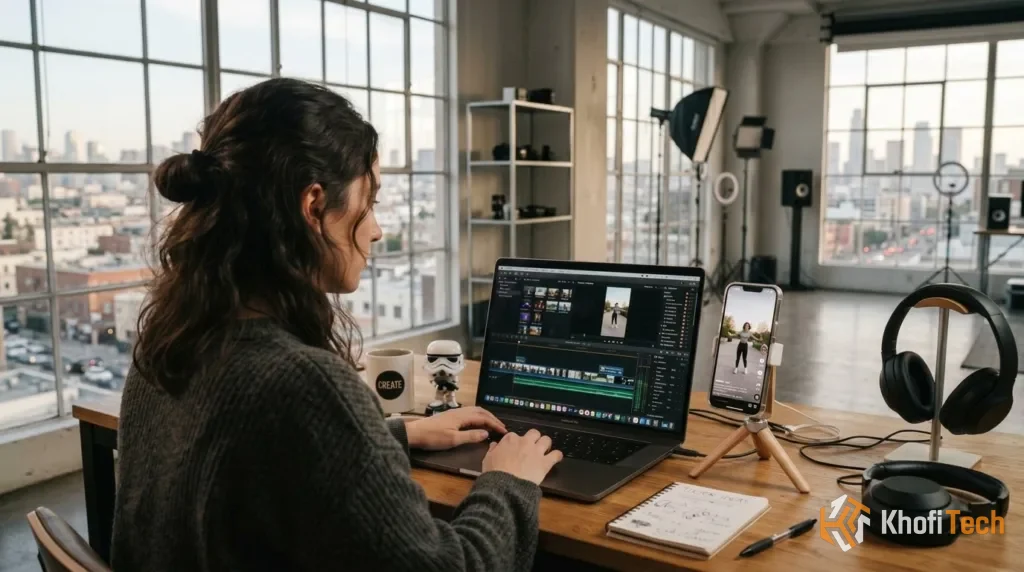
Growing on TikTok in 2026—especially if you are targeting the 1-minute+ video threshold required for the Creator Rewards Programme—takes far more than posting random 7-second clips. Writing tight retention hooks, recording clean voiceovers, adding word-by-word captions, and designing searchable profile covers can easily eat up four hours for a single upload.
The right AI workflow cuts that production time to under 30 minutes without requiring an expensive studio budget. Below are the 8 best free and affordable AI tools for TikTok creators in 2026, ranked by the exact production bottleneck each one solves.
Quick Comparison: Best AI Tools for TikTok (2026)
Here is how the top TikTok AI tools compare on primary job, free tier generosity, and starting paid pricing:
| AI Tool | Best TikTok Job | Free Tier? | Paid Plan From |
|---|---|---|---|
| CapCut | Vertical 9:16 editing, trending templates & beat-sync. | Yes (Strong free editor; no desktop watermark). | $9.99/mo (Standard) $19.99/mo (Pro). |
| Claude / ChatGPT | 3-second viral hooks, 1-minute+ retention scripts. | Yes (Daily usage on both platforms). | $20/month (Claude Pro / Plus). |
| ElevenLabs | Human-sounding voiceovers & AI sound effects. | Yes (Monthly free character allowance). | $5/month (Starter tier). |
| Submagic / Captions | Word-by-word animated captions & eye-contact fix. | Limited free trial / basic free tier. | ~$10–$19/month (Billed annually). |
| OpusClip | Repurposing YouTube & podcasts into 9:16 clips. | Yes (60 free monthly processing credits). | $15/month (Starter tier). |
| Canva | Searchable profile covers, overlays & Brand Kits. | Yes (Generous free design suite). | $15–$18/month (Canva Pro). |
#1 CapCut — Best Core Vertical Editor & Trend Templates
Built by ByteDance specifically around TikTok’s vertical 9:16 aspect ratio, CapCut remains the default video editor for short-form creators in 2026. Its template library tracks trending sounds and pacing shifts faster than third-party editors, and direct TikTok export skips extra file transfers.
- Standout AI Features: Auto-captions, one-click background removal, beat-sync cuts, AI color grading, and desktop multi-track editing without watermarks.
- 2026 Pricing Note: CapCut’s free tier still covers core trimming, templates, and desktop exports, while advanced AI credit tools sit behind Standard ($9.99/mo) and Pro ($19.99/mo) plans (checking out on desktop web is cheaper than mobile app store billing).
#2 Claude & ChatGPT — Best for 1-Minute+ Scripts & Hooks
Most TikTok videos fail in the first three seconds because the opening line rambles. Pairing Claude and ChatGPT gives you a free brainstorming and scriptwriting partner that structures 150-to-180-word scripts built specifically to hold viewers past the 60-second monetization mark.
- When to Use Claude: Best for natural, conversational storytelling scripts, educational breakdowns, and rewriting stiff drafts so they sound like a real person talking to camera.
- When to Use ChatGPT: Best for generating 10 scroll-stopping hook variations at once, batching a 30-day content calendar, and researching trending niche angles.
#3 ElevenLabs — Best Realistic AI Voiceovers for Faceless Channels
If you run a faceless storytelling, tech news, horror, or educational TikTok page, robotic text-to-speech voices cause viewers to swipe away immediately. ElevenLabs leads the industry in natural human pacing, emotional inflection, and crisp studio clarity.
- Standout Features: Realistic voice library, custom voice cloning, multilingual dubbing, and a prompt-based AI Sound Effects generator for transitions and suspenseful hits.
- Pricing: Includes a free monthly tier for testing short scripts, with paid Starter plans starting at just $5/month—making it one of the highest-value upgrades for faceless creators.
#4 Submagic & Captions — Best for Animated Subtitles & Auto-B-Roll
Over 70% of mobile users scroll TikTok with their sound low or muted, and dynamic word-by-word subtitles act as a visual anchor that boosts average watch time.
- Submagic: Automatically generates bold, highlighted word-by-word captions, drops relevant stock B-roll over talking-head pauses, and inserts zoom cuts and sound effects in one click.
- Captions App: Ideal for creators filming directly on their phone—combines auto-subtitles with AI Eye-Contact Correction (so you can read a script off-screen while looking straight into the lens) and studio audio cleanup.
#5 OpusClip — Best for Turning Long Videos into Viral Clips
If you already record YouTube tutorials, podcasts, or live masterclass sessions, OpusClip scans your long-form video, identifies the highest-retention moments, reframes speakers into vertical 9:16 framing, and adds animated captions automatically.
- Pricing: Offers 60 free processing credits every month (enough to test several long videos), with paid plans starting at $15/month.
#6 Canva — Best for Searchable TikTok Covers & Brand Kits
TikTok functions heavily as a visual search engine. Adding a clean, readable 3-to-4-word title cover to your videos encourages profile visitors to binge-watch your series instead of scrolling past.
- Standout Features: Custom
1080 × 1920TikTok cover templates, Brand Kit storage for consistent fonts and colors, one-click background removal, and Magic Resize for cross-posting graphics to WhatsApp Channels and Instagram.
How to Build a $0/Month TikTok AI Stack (And Stay Monetization-Safe)
You do not need expensive subscriptions to start publishing high-retention 1-minute+ videos. Combine these four free tiers into a single repeatable workflow:
- Script (Claude or ChatGPT Free): Prompt the AI for a 160-word script with a curiosity hook in the first 3 seconds and a clear payoff at the end.
- Voiceover (ElevenLabs Free or Your Own Mic): Record clean narration or generate an expressive voice track.
- Edit & Caption (CapCut Desktop Free): Layer screen recordings, B-roll, or original footage in
9:16, cut pauses every 3–4 seconds, and apply auto-captions. - Cover Design (Canva Free): Export a clean cover frame with bold title text so your profile grid looks organized and searchable.
Frequently Asked Questions
Quick answers to common questions
The strongest free AI stack for TikTok creators in 2026 combines CapCut (for vertical 9:16 editing and templates), Claude or ChatGPT (for 1-minute+ retention scripts and hooks), Canva (for profile covers and visual overlays), and ElevenLabs' free tier (for realistic AI voiceovers).
Yes, TikTok allows AI-assisted scripting, voiceovers, and editing, provided your videos are at least 1 minute long, deliver genuine original value or commentary, and follow TikTok's AI-generated content labeling rules.
CapCut, Submagic, and Captions are the top apps for generating word-by-word animated TikTok subtitles. CapCut offers built-in captions in its free editor, while Submagic and Captions specialize in dynamic highlight animations and auto-B-roll.
Start by using Claude or ChatGPT to outline a 150-to-180-word script with a 3-second hook, record or generate narration in ElevenLabs, and edit with CapCut or OpusClip to automatically cut dead air and add dynamic captions.
Ask Khofi Tech
Related stories

How to Get Canva for Education for Free
Learn how to get free access to Canva for Education. We break down teacher verification rules, student access workflows, Pro feature comparisons, and safety tips.
10 Best Apps for Content Creators in 2026 (Free & Paid)
Discover the 10 best apps for content creators in 2026. From free video editing on CapCut and Canva to mobile monetization and scripting on Android & iOS
ChatGPT for Academic Research and Exam Prep (2026 Guide)
Learn how to ethically use ChatGPT for academic research and exam prep. Copy proven prompts for active recall, literature reviews, and mock exams.
Thread (0)