

Samsung Galaxy Tab S12 Plus Review: Workstation or Luxury?
An in-depth review of the Samsung Galaxy Tab S12 Plus. We benchmark sustained performance, DeX multitasking, S Pen latency, and 45W PPS charging speeds.

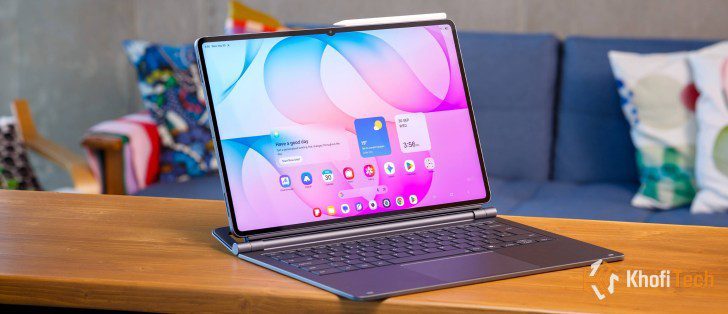
The Samsung Galaxy Tab S12 Plus targets power users and enterprise professionals who need high-throughput multitasking without lugging a traditional laptop chassis. Positioned right between the compact base slate and the oversized 14.6-inch Ultra, this 12.6-inch tablet combines an anti-reflective Dynamic AMOLED 2X panel, a bundled low-latency S Pen, and Samsung DeX into a razor-thin 5.3 mm aluminum frame.
Anti-Reflective AMOLED & Industrial Build
At 5.3 mm thin and 553 grams, the Armor Aluminum body is exceptionally rigid with an IP68 dust and water resistance rating across both tablet and stylus. The main hardware highlight is the anti-reflective display coating. Unlike the mirror-finish glass on standard tablets, this micro-etched layer scatters overhead fluorescent lighting and direct sunlight without washing out dynamic range or creating grain.
Galaxy Tab S12 Plus: Key Hardware
Desktop Productivity: Can DeX Replace a Laptop?
Connected to a keyboard or an external monitor, Samsung DeX launches a full desktop-class windowing environment. You can freely resize applications, maintain multi-column split views, and manage files via a standard desktop folder hierarchy. With DisplayPort over USB-C 3.2, it effortlessly drives a 4K 60Hz monitor while the tablet remains active as an S Pen drawing canvas.
The only operational bottlenecks stem from mobile software architecture: Android Chrome still does not support desktop Chrome Web Store extensions natively, and developers are limited to cloud-based IDEs or terminal emulation.
Sustained Performance & Thermals
Powered by the 3nm MediaTek Dimensity 9500 paired with 12GB of LPDDR5X RAM, the Tab S12 Plus handles heavy multitasking, 4K multi-stream editing in LumaFusion, and complex vector rendering without stutter. A redesigned internal vapor chamber keeps peak skin temperatures under 41°C (105°F) during sustained 3D benchmark stress loops, preventing sudden frame drops.
Noticing thermal throttling or charging interruptions while running multi-window DeX setups? Read our hardware guide on Samsung Galaxy Overheating When Charging: 5 Causes & Fixes to keep operating thermals in check.
Battery Life & 45W PPS Charging Realities
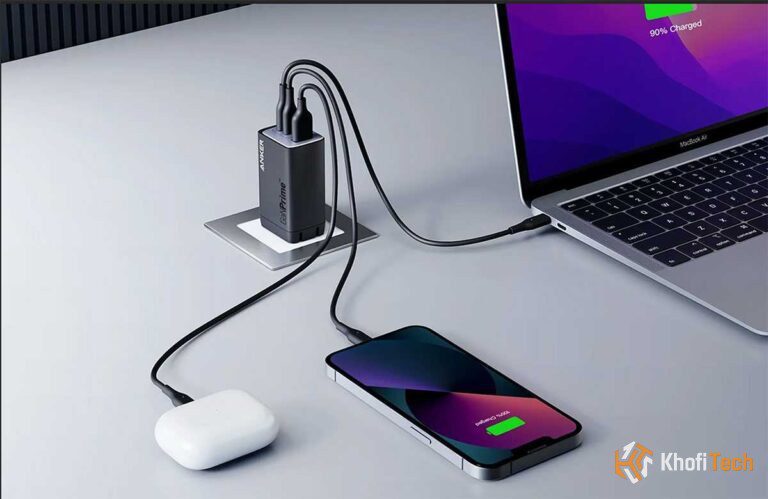
The 10,600 mAh battery delivers 8 to 9 hours of continuous DeX multitasking and over 14 hours of video playback. Fast charging peaks at 45W via Super Fast Charging 2.0:
- 0% to 50%: 34 minutes (using 45W Samsung or Anker PPS charger)
- 0% to 100%: 82 minutes
- Generic 65W/100W Laptop Bricks (Non-PPS): Drops to standard 15W, taking more than 2 hours to complete.
To achieve full charging speeds, you must use a charger verified for USB-PD 3.0 PPS (10V/4.5A) alongside a certified 5A e-Marked USB-C cable.
- Industry-leading anti-reflective screen treatment
- Bundled low-latency S Pen in the box
- Robust DeX desktop output with full 4K display support
- MicroSD expansion up to 1.5 TB
- No wall charger included in retail packaging
- First-party keyboard accessories remain costly
- Non-PPS chargers drop to slow 15W charging profiles
The KhofiTech Verdict
The Galaxy Tab S12 Plus is an exceptional Android workstation. If your daily workflow centers on cloud platforms, digital illustration, content staging, project management, and video conferencing, it provides an ultra-portable alternative to a laptop with unmatched display quality and zero stylus upcharge.

Thread (0)