

How to Claim the Free 1-Year Google AI Student Offer in Ghana (Step-by-Step)
Get 12 months of free Google AI Plus in Ghana. Here is the step-by-step guide for university students to verify their status and claim Gemini plus


Artificial intelligence has become an essential study partner for university students handling research papers, technical coursework, coding, and exam preparation. To support higher education across Africa, Google has rolled out an official student offer granting eligible tertiary students 12 months of free access to Google AI Plus.
Whether you are studying at the University of Ghana, KNUST, Accra Technical University, UCC, UPSA, or an accredited private university, here is everything you need to know about what the offer includes, who qualifies, and how to activate your 1-year free subscription without running into payment traps.
What Is the Google AI Student Offer?
The student initiative is designed to give enrolled tertiary students access to premium AI study tools and upgraded storage without paying monthly subscription fees.
Important distinction: The plan provided through this African student rollout is Google AI Plus, not Google AI Pro. While Google AI Pro carries higher computing tiers and enterprise features, Google AI Plus is tailored specifically for personal productivity, study workflows, and academic research.
What Do Students Get for Free?
Activating the 12-month offer unlocks several practical tools for your academic and creative work:
Advanced Gemini AI Access: Enhanced reasoning and faster responses for research queries, drafting essays, brainstorming, and summarizing dense academic PDFs.
Study & Revision Assistance: Integrated study tools to help you organize lecture notes, generate practice quizzes, break down complex concepts, and build interactive study guides.
Expanded Cloud Storage: Generous cloud storage (up to 400 GB depending on regional plan terms) shared seamlessly across Google Drive, Gmail, and Google Photos—meaning no more “Storage Almost Full” warnings when backing up assignments and project files.
Higher Usage Caps: Significantly higher daily prompt and upload limits compared to the standard free tier of Gemini.
Who Is Eligible in Ghana?
To qualify for the offer, you must meet the following criteria:
1. Active Student Status: You must be currently enrolled in an accredited degree, diploma, or higher national diploma (HND) program at a recognized Ghanaian tertiary institution.
2. Age Requirement: You must meet the minimum standard age requirement for managing a personal Google account (18+ for paid/subscription products).
3. Personal Google Account: The offer must be claimed using a standard personal Google Account (@gmail.com). Do not use your institutional Workspace account (@st.ug.edu.gh, @atu.edu.gh, etc.) as primary administrator restrictions may block consumer subscription upgrades.
4. Valid Verification Proof: You will need a valid student ID card, an official university admission letter, or access to your active institutional student email address to complete student verification.
Step-by-Step: How to Claim Your Free 12 Months
Follow these steps carefully to ensure your verification goes through on the first attempt:
Step 1: Prepare Your Documents
Before visiting the portal, make sure you have:
A clear photo or scan of your Current Student ID Card (showing your full name, institution name, and current academic year/expiry date).
Alternatively, have your institutional student email address handy if your university uses an .edu.gh domain.
Step 2: Sign In to Your Personal Google Account
Open your browser, log out of any secondary accounts, and sign in exclusively to the personal Google account where you want your 12-month upgrade and cloud storage applied.
Step 3: Visit the Official Student Offer Page
Navigate to the official Google Gemini Student Offer landing page. When the page loads, click on the “Claim a student plan at no cost” button.
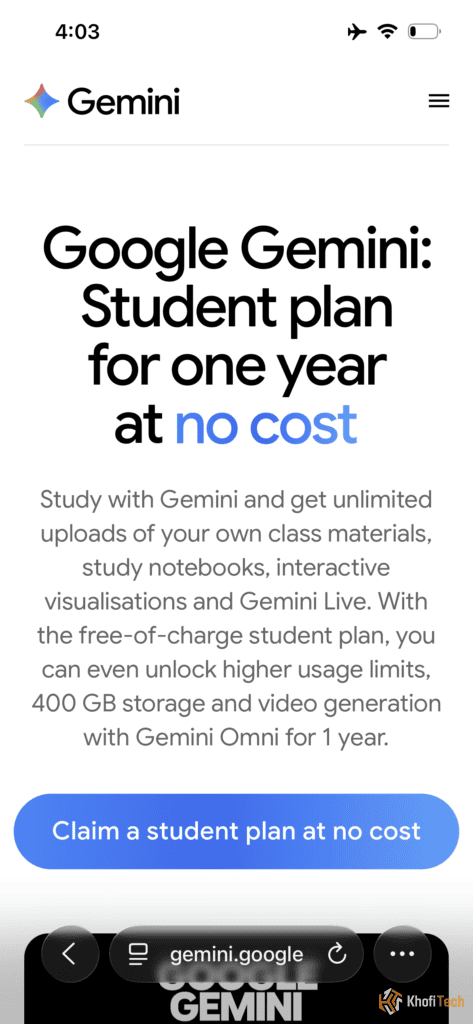
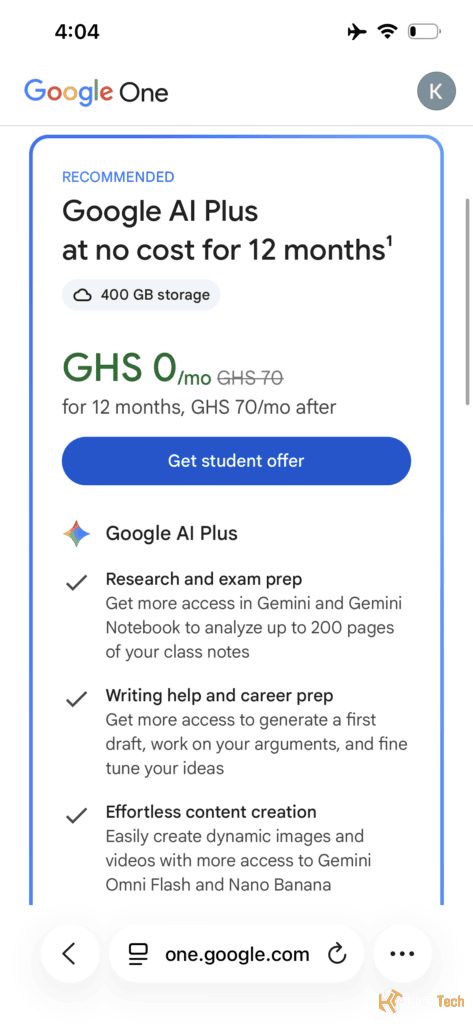
Step 4: Complete the Student Verification (SheerID)
Google uses an automated academic verification partner (such as SheerID) to confirm student status:
Select Ghana as your country.
Type the name of your university or college in the institution search box.
Enter your first and last name exactly as they appear on your school records.
Enter your date of birth and your student email address (if prompted).
If your institution does not support instant email verification, you will be prompted to upload a document (Student ID or official proof of enrollment). Upload a clear JPG or PDF.
Step 5: Review the Subscription Terms & Activate
Once your student status is verified:
1. Confirm the plan details (Google AI Plus – 12 Months Free).
2. If prompted to link a payment method for identity verification, enter a working card (such as a local bank card or a virtual dollar card).
3. Complete the checkout. Your account balance will reflect a GHS 0.00 / $0.00 charge for the first 12 billing cycles.
The Auto-Renewal Trap: How to Avoid Unexpected Charges
Like most subscription services, Google’s student plan is set to automatically renew at the standard monthly rate once your 12-month promotional period expires.
To avoid unexpected charges:
1. Note Your Expiry Date: Immediately after activating, open your Google Account settings, go to Payments & Subscriptions, and check the exact renewal date for 2027.
2. Set a Calendar Reminder: Create a reminder in Google Calendar for 11 months from now (e.g., 2 to 3 weeks before the promo expires).
3. Cancel Anytime Without Losing Access: On most Google subscription tiers, you can cancel auto-renewal in advance; your promotional benefits will usually remain active until the full 12-month term concludes.
Frequently Asked Questions
Quick answers to common questions
It is strongly recommended to activate the offer on your personal Gmail account, and simply use your school email address inside the verification form when proving you are a student. This ensures that you keep your files, notes, and extra storage even after you graduate or if the university resets its student email database.
If your institution’s name does not show up in the drop-down list, select the option to submit documentation manually. Uploading an official admission letter or a stamped statement of results showing your active enrollment will trigger a manual review, which typically takes 24 to 48 hours.
If you choose not to renew the subscription after 1 year, your existing files in Google Drive, Gmail, and Google Photos will remain safe and accessible. However, you will not be able to upload new files or receive new emails if your total stored data exceeds the standard free 15 GB limit until you either renew or delete excess data.
Ask Khofi Tech
Related stories
TikTok Creator Rewards: UK Account Setup & Monetization (2026)
Learn how to set up and verify a UK TikTok account for the Creator Rewards Program in 2026, check eligibility rules, and join KhofiTech's live class
How to Get Canva for Education for Free
Learn how to get free access to Canva for Education. We break down teacher verification rules, student access workflows, Pro feature comparisons, and safety tips.
10 Best Apps for Content Creators in 2026 (Free & Paid)
Discover the 10 best apps for content creators in 2026. From free video editing on CapCut and Canva to mobile monetization and scripting on Android & iOS
Thread (0)